Teaching-in radio components
Activate teach-in mode (teach mode): Switch the receiver fan to teach-in mode
- Press the teach-in button on the fan for at least 2 seconds.
The button LED flashes, teach-in mode is activated. The receiver fan must receive a teach-in telegram within 60 seconds. Otherwise, the teach-in mode is ended/exited.
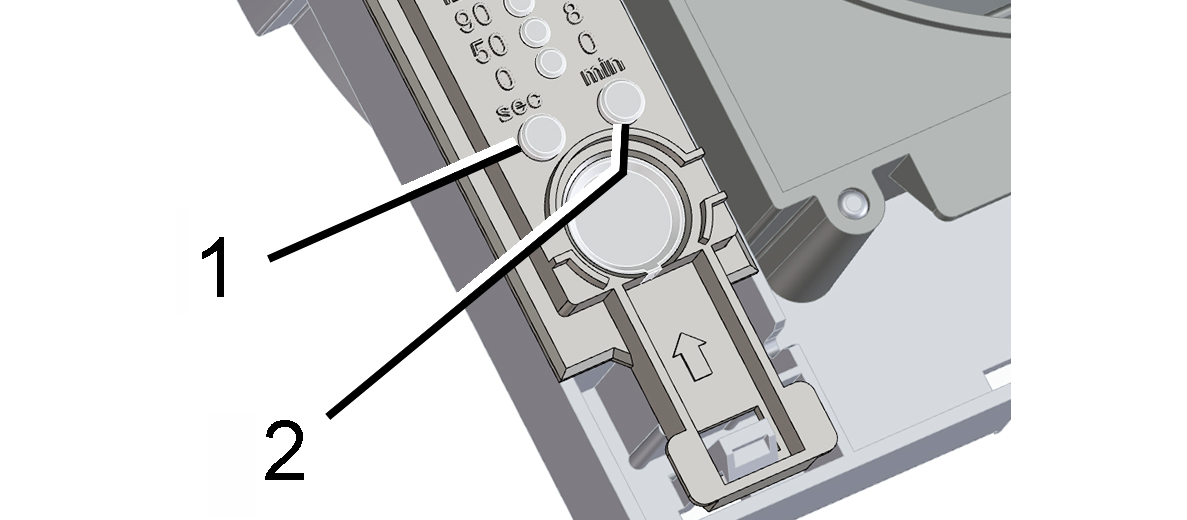
1 | Teach-in button |
2 | LED |
If a teach-in telegram is received correctly, the button LED on the receiver lights up for 1 second. The transmitter is now taught in.
Teaching-in radio switch (transmitter)
For radio switches (DS RC double rocker switches) teach in both rockers separately (2 ducts).
- Activate teach-in mode on the receiver fan. The button LED flashes. The teach-in mode is activated.
- Press the radio switch's right-hand rocker switch 3 times within 2 seconds . The teach-in telegram is sent. The button LED lights up for 1 second after successful teach-in. If transfer was faulty, the button LED flashes briefly 3 times.
- Reactivate teach-in mode on the receiver fan.
- Press the radio switch’s left-hand rocker switch 3 times within 2 seconds. The teach-in telegram is sent. The button LED lights up for 1 second after successful teach-in. If transfer was faulty, the button LED flashes briefly 3 times.
- Reactivate teach-in mode on the receiver fan.
- Press the radio switch's right-hand rocker switch 3 times within 2 seconds . The teach-in telegram is sent.
Teaching-in radio window contact (transmitter)
- Activate teach-in mode on the receiver fan. The button LED flashes. The teach-in mode is activated.
- Press the teach-in button on the radio window contact. The teach-in telegram is sent. The button LED lights up for 1 second after successful teach-in. If transfer was faulty, the button LED flashes briefly 3 times.