Replacing the air filter
Check the air filters (unit, external and room filter) regularly, depending on the amount of soiling. Select shorter change intervals if a lot of dust or dirt is produced. Change the air filter as needed. Only use original air filters.
Manufacturer recommendations:
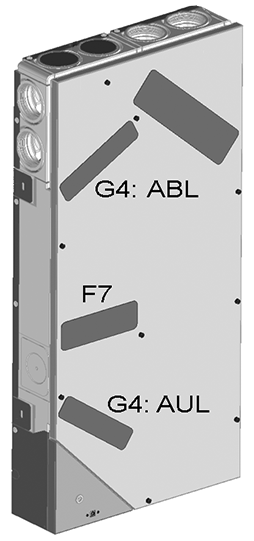
• G4 and F7 unit filters every 3 months
• Optional external filter every 6 months
• Optional room filter every 2 months
Ordering with the MAICO@HOME app: Select the Ventilation/Filter/Action menu to order the right air filters directly from the factory.
• G4 replacement filter: Article no. 0093.1589
• F7 fine dust filter: Article no. 0093.1588
Call up filter service life with the MAICO@HOME app: Go to the Ventilation/Filter menu to view the current remaining filter lives.
Changing G4 and F7 unit filters
If the two middle ventilation level LEDs flash on the control unit, a filter change is due. Additionally, the LED lights up white on the control unit. This function is only enabled with the status display activated.
 Recommendation: Change the unit filters together.
Read the supplementary safety instructions before removing the front cover.
Video – WS 75 air filter change

 CAUTION Danger of cuts if glass breaks or glass parts are damaged.
Glass parts of the front covers or the control unit are fragile. Take care when installing/removing. Sharp edges and splinters that can cause cuts if the glass breaks. Proceed with caution. Use protective gloves if necessary. Observe safety instructions.
- APA/UPA/UPGA units: Remove the front cover.
- Remove the filter cover(s).
- Pull the unit filter out of the ventilation unit.
- Carefully slide the new filters into the filter shaft. Do not press filter in (cellulose). Only press in at reinforced corners. Make sure that the air direction arrow is facing downwards. Only use original filters.
- APA/UPA/UPGA units: Insert the design or glass cover at the bottom into the guide of the AP metal shell sheet or UP shell tray and engage it at the top with the locking lever. Ensure that the cover is also correctly engaged. If necessary, turn the locking lever as far as it will go.
- Acknowledge the filter change on the RLS G1 WS room air control.
To do this, press the and
and  buttons together for 3 seconds, the flashing stops.
Also acknowledge a premature filter change and reset the filter change interval. If resetting prematurely, press the and buttons at the same time for 10 seconds. The LED flashes briefly. The filter change interval is reset.
Alternatively, reset the filter change interval in the MAICO@HOME app/the AIR@home web tool. - Dispose of the air filter in accordance with national regulations, see chapter Environmentally responsible disposal.